

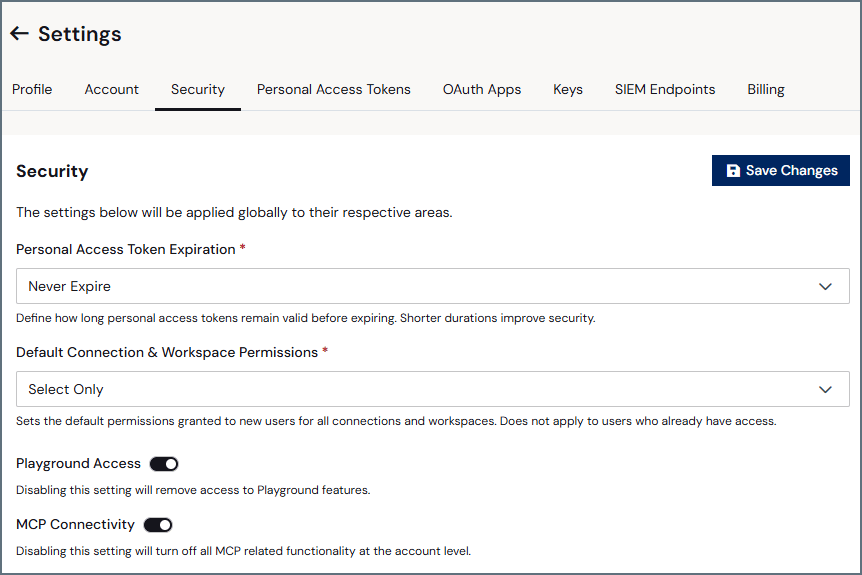
Personal Access Token Expiration
This section allows you to set a global Personal Access Token (PAT) expiration (such as 30 Days, 60 Days, or Never Expire). Shorter durations improve security. When the PAT expires, the PAT displays Expired in the Security tab of Settings, and any authentication using the PAT fails with an"Invalid personal access token" error.
To create a PAT, see Personal Access Tokens.
Default Connection & Workspace Permissions
From the drop-down list, select the default permissions granted to new users for all connections and workspaces. Options include No Permissions to connections and workspaces by default or Select Only permissions to connections and workspaces by default.This setting does not affect the connection and workspace access of existing users.
Playground Access
Toggle this feature off if you do not want your users to have access to Playground.MCP Connectivity
Toggle this feature off if you do not want your users to have access to any MCP-related functionality.SSO
Just-in-Time (JIT) User Provisioning automatically provisions new users the first time they sign in to an SSO-enabled domain.
1
Enable the toggle for a domain to turn on JIT provisioning.
2
Select the JIT User Role for new JIT users.
3
Select the JIT Access Role for new JIT users.
4
Click Save Changes.