

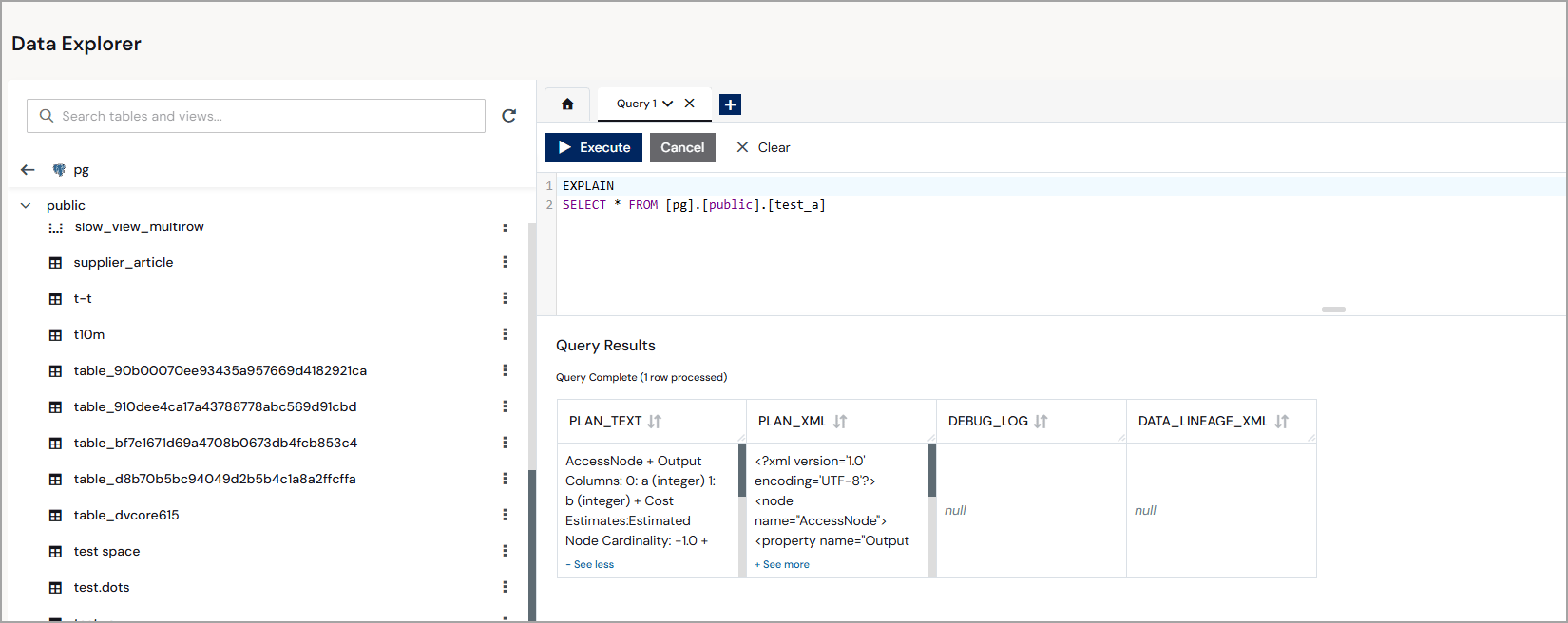
EXPLAIN
Returns the execution plan for a SQL statement. EXPLAIN supports SELECT, DELETE, and other DML statements. The result set contains a single column,plan, of type string.
SQL Syntax
CROSS APPLY / OUTER APPLY
A lateral join that applies a table-valued function or subquery to each row of the left table.CROSS APPLYExcludes left-side rows where the applied expression returns no rows (equivalent to an inner join).OUTER APPLYKeeps left-side rows even when the applied expression returns no rows, filling unmatched columns with NULL (equivalent to a left join).
Window Functions
Window functions are evaluated in the DV Engine and are not pushed down to individual data sources.LEAD
Returns the value ofexpr from a row that is offset rows ahead of the current row in the window. Returns default when no such row exists.
Syntax
- expr The expression to evaluate in the target row.
- offset The number of rows ahead to look. The default value is 1.
- default The value to return when no row exists at the specified offset. The default value is NULL.
LAG
Returns the value ofexpr from a row that is offset rows before the current row in the window. Returns default when no such row exists.
Syntax
- expr The expression to evaluate in the target row.
- offset The number of rows behind to look. The default value is 1.
- default The value to return when no row exists at the specified offset. The default value is NULL.
FIRST_VALUE
Returns the first value in the current window frame. Syntax- expr The expression to evaluate.
LAST_VALUE
Returns the last value in the current window frame. Syntax- expr The expression to evaluate.
Aggregate Functions
STDDEV_POP / STDDEV_SAMP
Returns the population or sample standard deviation of a numeric column. Syntax- expr The numeric column or expression to evaluate.
VAR_POP / VAR_SAMP
Returns the population or sample variance of a numeric column. Syntax- expr The numeric column or expression to evaluate.
STRING_AGG
Concatenates the values in a group into a single string, separated by the specified delimiter. Syntax- expr The column or expression to concatenate.
- delimiter The separator string to place between concatenated values.
When
DISTINCT or ORDER BY is used inside STRING_AGG, evaluation occurs in the DV Engine and is not pushed down to the source.JSONARRAY_AGG
Collects the values in a group into a JSON array. Returns a JSON-typed value. Syntax- expr The column or expression to collect.
String Functions
REGEXP_REPLACE
Replaces substrings that match a regular expression pattern. Syntax- str The input string.
- pattern The regular expression to match.
- replacement The string to substitute for each match.
- flags Optional modifier flags:
g(replace all matches),m(multiline),i(case-insensitive).
REGEXP_INSTR
Returns the 1-based start position of the first match of a regular expression in a string. Returns 0 if there is no match. Syntax- str The input string.
- pattern The regular expression to match.
REGEXP_SUBSTR
Returns the substring matched by a regular expression. Returns NULL if there is no match. Syntax- str The input string.
- pattern The regular expression to match.
SPLIT_PART
Returns the Nth field after splitting a string on a delimiter. Fields are 1-based. Syntax- str The input string.
- delimiter The delimiter string.
- n The 1-based index of the field to return.
BASE64_ENCODE / BASE64_DECODE
Encodes binary data as a Base64 string, or decodes a Base64 string back to binary. Syntax- bytes The binary data to encode.
- str The Base64-encoded string to decode.
TEXT_ENCODE / TEXT_DECODE
Converts between a string and bytes using a named character set. Syntax- str The string to encode.
- bytes The byte sequence to decode.
- charset The character set name, such as
UTF-8orISO-8859-1.
similarity
Returns a fuzzy string similarity score between 0.0 and 1.0. Syntax- v1 The first string.
- v2 The second string to compare with
v1. - algorithm Optional. The similarity algorithm to use. The default value is
jaro-winkler. Alternatives includelevenshtein.
Security and Crypto Functions
SHA1 / SHA2_256 / SHA2_512
Computes a SHA hash of the input text and returns the result as a binary value. Use these functions as direct alternatives toHASHBYTES when you want to specify a fixed algorithm.
Syntax
- text The string to hash.
AES_ENCRYPT / AES_DECRYPT
Encrypts or decrypts a string using AES-256 symmetric encryption. Syntax- text The plaintext string to encrypt.
- bytes The encrypted byte sequence to decrypt.
- key The AES-256 encryption key.
JSON Functions
JSONPATHVALUE
Extracts a scalar value from a JSON document using a JSONPath expression. This function is an alias forJSON_EXTRACT and is pushed down to CData drivers.
Syntax
- json The JSON document to query.
- path The JSONPath expression identifying the scalar value to extract.
- nullLeaf Optional Boolean. When
true, a missing leaf node returns NULL instead of raising an error.
JSONQUERY
Extracts a JSON fragment (an object or array) at the specified JSONPath. Returns a JSON-typed value, not a scalar. Syntax- json The JSON document to query.
- path The JSONPath expression identifying the array or object to extract.
- nullLeaf Optional Boolean. When
true, a missing leaf node returns NULL instead of raising an error.
JSONPARSE
Parses a string or CLOB value as JSON. Syntax- clob The string or CLOB to parse.
- wellformed Boolean. When
true, the function skips JSON validation.
JSONOBJECT
Constructs a JSON object from one or more name/value pairs. Syntax- expr The value expression for a key.
- name The key name for the value.
JSONARRAY
Constructs a JSON array from a list of values. Syntax- expr One or more values to include in the array.
JSONTOXML
Converts a JSON value to an XML document. Syntax- rootName The name to use as the root XML element.
- json The JSON value to convert.
JSONTOARRAY
Extracts values from a JSON document using multiple JSONPath expressions and returns them as an array. Each colpath extracts one value from each element matched by the base path. Syntax- json The JSON document to query.
- path The base JSONPath for array iteration.
- nullLeaf Boolean. When
true, missing leaf nodes return NULL instead of raising an error. - colpaths One or more JSONPath expressions, each extracting a value from the current array element.
JSONPath Slice Syntax
The DV Engine extends standard JSONPath with array slice notation:
Examples
Array Functions
ARRAY_GET
Returns the element at a 1-based index from an array. Syntax- arr The array to access.
- idx The 1-based index of the element to return.
ARRAY_LENGTH
Returns the number of elements in an array. Syntax- arr The array to measure.
ARRAY_ADD
Returns a new array with a value appended to the end. Syntax- arr The source array.
- value The value to append.
ARRAY_IN
Returnstrue if a value is an element of the array.
Syntax
- haystack The array to search.
- needle The value to look for.
ARRAY_LIKE
Returnstrue if any element in the array matches a LIKE pattern.
Syntax
- haystack The array to search.
- pattern The LIKE pattern to match against each element.
ARRAY_LIKE_REGEX
Returnstrue if any element in the array matches a regular expression pattern.
Syntax
- haystack The array to search.
- pattern The regular expression to match against each element.
ASARRAY / ASLIST
Constructs an array or list from individual values. ASLIST-Returns arguments as a list: returns an Object (java.util.List).ASARRAY-Returns arguments as an array: returns a SQL array.
Use ASARRAY when a SQL array type is needed. Use ASLIST when a generic list is expected; for example, as input to other functions that accept a list.
- v1, v2, … The values to include in the array or list.
Numeric Functions
BITAND / BITOR / BITXOR
Performs a bitwise AND, OR, or XOR operation on two integers. Syntax- x The first integer.
- y The second integer.
BITNOT
Performs a bitwise NOT operation on an integer. Syntax- x The integer to negate bitwise.
Date and Time Functions
DATE_FORMAT
Formats a date or timestamp as a string using a MySQL-style format pattern. Syntax- date The date or timestamp value to format.
- format The format pattern string (for example,
'%Y-%m-%d'or'%Y-%m-%d %H:%i:%s').
ISOWEEK / ISOYEAR
Returns the ISO 8601 week number or ISO year for a given date. Week 1 is the week that contains the first Thursday of the year. Syntax- date The date value to evaluate.
Date-Range Functions
The DV Engine provides convenience functions that return date-range boundary values. Use these inWHERE clauses with BETWEEN or comparison operators to filter by relative time periods.
L_LAST_MONTH / L_THIS_MONTH / L_NEXT_MONTH
Returns the start boundary of the previous, current, or next calendar month.L_LAST_N_MONTHS(n) / L_NEXT_N_MONTHS(n)
Returns the start boundary of a rolling window of N calendar months backward or forward from today.L_LAST_QUARTER / L_THIS_QUARTER / L_NEXT_QUARTER
Returns the start boundary of the previous, current, or next calendar quarter.L_LAST_N_QUARTERS(n) / L_NEXT_N_QUARTERS(n)
Returns the start boundary of a rolling window of N quarters backward or forward from today.L_LAST_YEAR / L_THIS_YEAR / L_NEXT_YEAR
Returns the start boundary of the previous, current, or next calendar year.L_LAST_N_YEARS(n) / L_NEXT_N_YEARS(n)
Returns the start boundary of a rolling window of N years backward or forward from today.L_LAST_90_DAYS / L_NEXT_90_DAYS
Returns the boundary date for a rolling 90-day window backward or forward from today.Miscellaneous Functions
UUID
Generates a new random UUID string. SyntaxOptimizer Hints
Optimizer hints are embedded in SQL comments and instruct the DV Engine on how to plan query execution. They do not change query results.MAKEDEP
Forces a dependent join: the engine evaluates this table first and uses its key values as aWHERE key IN (...) filter when querying the other source. This reduces the number of rows fetched from large sources.
Syntax