> ## Documentation Index
> Fetch the complete documentation index at: https://docs.cloud.cdata.com/llms.txt
> Use this file to discover all available pages before exploring further.
# LLM Providers
> LLM Gateway 用にLLM プロバイダーの認証情報を登録・管理します。
***LLM Providers*** ページには、利用可能なLLM プロバイダー、モデル、およびゲートウェイがそれらに到達するために使用するAPI キーの一覧が表示されます。LLM Gateway は、Anthropic、Azure OpenAI、Cohere、カスタムOpenAI 互換プロバイダー、Google Gemini、OpenAI の各外部プロバイダーをサポートしています。
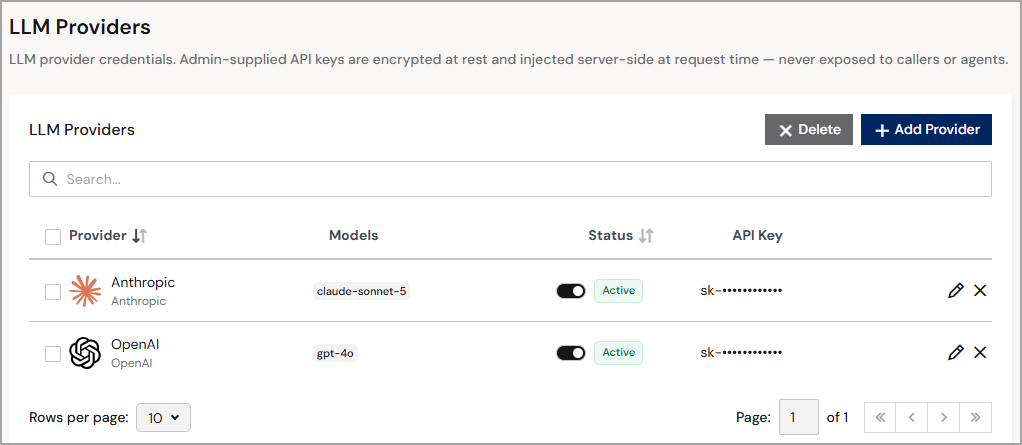 各プロバイダーには、次の情報が表示されます:
* **Provider**—LLM プロバイダーのわかりやすい名前と種類。
* **Models**—使用しているLLM(例: *gpt-4o* や*claude-sonnet-5* )。
* **Status**—LLM プロバイダーのステータス:**Active** または**Inactive**。
* **API Key**—LLM プロバイダーから取得したAPI キーのマスク表示。プロバイダーの登録後はAPI キーを編集できません。API キーを更新するには、プロバイダーを削除してから再度追加してください。
各プロバイダーには、編集アイコンと削除アイコンも表示されます。プロバイダーの編集ページでは、プロバイダーの**Name** を編集したり、**Models** を追加・削除したりできます。完了したら**Save Changes** をクリックします。プロバイダーを削除するには、削除アイコンをクリックします。
## プロバイダーの追加
各プロバイダーについて、登録する前にそのプロバイダーの開発者コンソールからAPI キーを取得してください。
新しいLLM プロバイダーを登録するには、次の手順を行います:
**+ Add Provider** をクリックします。**Add LLM Provider** ダイアログが表示されます。
プロバイダーに関する次の情報を入力します(Step 1):
* **Name**—プロバイダーのわかりやすい名前を入力します。
* **Provider**—サポートされているプロバイダーの種類を選択します。
* **Base URL**—(Azure OpenAI のみ)プロバイダーのベースエンドポイントを入力します(例: *[https://my-endpoint.example.com/v1](https://my-endpoint.example.com/v1)* )。
* **API Key**—プロバイダーのAPI キーを入力します。
プロバイダーで使用するLLM モデルを追加します(Step 2)。**+ Add Model** をクリックし、モデル名を入力します。追加のモデルを入力するにはこの手順を繰り返します。
モデルの追加が完了したら、**Add** をクリックします。LLM プロバイダーが**LLM Providers** ページに**Active** のステータスで表示されます。
This documentation is built and hosted on [Mintlify](https://mintlify.com), a developer documentation platform.
各プロバイダーには、次の情報が表示されます:
* **Provider**—LLM プロバイダーのわかりやすい名前と種類。
* **Models**—使用しているLLM(例: *gpt-4o* や*claude-sonnet-5* )。
* **Status**—LLM プロバイダーのステータス:**Active** または**Inactive**。
* **API Key**—LLM プロバイダーから取得したAPI キーのマスク表示。プロバイダーの登録後はAPI キーを編集できません。API キーを更新するには、プロバイダーを削除してから再度追加してください。
各プロバイダーには、編集アイコンと削除アイコンも表示されます。プロバイダーの編集ページでは、プロバイダーの**Name** を編集したり、**Models** を追加・削除したりできます。完了したら**Save Changes** をクリックします。プロバイダーを削除するには、削除アイコンをクリックします。
## プロバイダーの追加
各プロバイダーについて、登録する前にそのプロバイダーの開発者コンソールからAPI キーを取得してください。
新しいLLM プロバイダーを登録するには、次の手順を行います:
**+ Add Provider** をクリックします。**Add LLM Provider** ダイアログが表示されます。
プロバイダーに関する次の情報を入力します(Step 1):
* **Name**—プロバイダーのわかりやすい名前を入力します。
* **Provider**—サポートされているプロバイダーの種類を選択します。
* **Base URL**—(Azure OpenAI のみ)プロバイダーのベースエンドポイントを入力します(例: *[https://my-endpoint.example.com/v1](https://my-endpoint.example.com/v1)* )。
* **API Key**—プロバイダーのAPI キーを入力します。
プロバイダーで使用するLLM モデルを追加します(Step 2)。**+ Add Model** をクリックし、モデル名を入力します。追加のモデルを入力するにはこの手順を繰り返します。
モデルの追加が完了したら、**Add** をクリックします。LLM プロバイダーが**LLM Providers** ページに**Active** のステータスで表示されます。
This documentation is built and hosted on [Mintlify](https://mintlify.com), a developer documentation platform.