> ## Documentation Index
> Fetch the complete documentation index at: https://docs.cloud.cdata.com/llms.txt
> Use this file to discover all available pages before exploring further.
# OAuth Apps
> Generate custom OAuth applications for client integrations.
The **OAuth Apps** tab allows you to generate a custom OAuth application for client integrations. It contains a list of available OAuth apps, including their application type and creation date.
 ## Create a Custom OAuth Application
To create a custom OAuth application:
Click **+ Create App**. The **Create OAuth App** dialog appears.
## Create a Custom OAuth Application
To create a custom OAuth application:
Click **+ Create App**. The **Create OAuth App** dialog appears.
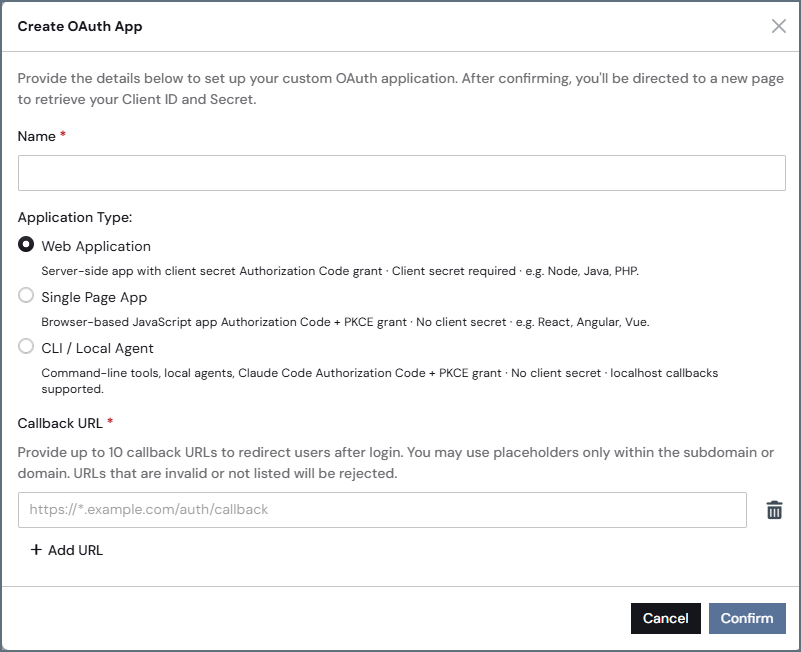 Enter the **Name** of the OAuth app.
Select the **Application Type** for your OAuth application.
For service and automated applications, use [Service Accounts](/en/Service-Accounts) instead.
* **Web Application**–select this option for service-side apps with a client secret Authorization Code grant. A client secret is required.
* **Single Page App**–select this option for browser-based Authorization Code + PKCE grant. No client secret is required.
* **CLI/Local Agent**–select this option for command-line tools. No client secret is required.
Go to your client application and create a new application registration there. The client application will provide a callback URL.
Return to the **Create OAuth App** dialog in Connect AI and paste the **Callback URL** from the client application. This URL redirects users after login. You can provide up to 10 callback URLs for your OAuth app.
Click **Confirm**. Connect AI creates the OAuth app and generates a **Client Id** and **Client Secret** for the client application. Copy these values.
Enter the **Name** of the OAuth app.
Select the **Application Type** for your OAuth application.
For service and automated applications, use [Service Accounts](/en/Service-Accounts) instead.
* **Web Application**–select this option for service-side apps with a client secret Authorization Code grant. A client secret is required.
* **Single Page App**–select this option for browser-based Authorization Code + PKCE grant. No client secret is required.
* **CLI/Local Agent**–select this option for command-line tools. No client secret is required.
Go to your client application and create a new application registration there. The client application will provide a callback URL.
Return to the **Create OAuth App** dialog in Connect AI and paste the **Callback URL** from the client application. This URL redirects users after login. You can provide up to 10 callback URLs for your OAuth app.
Click **Confirm**. Connect AI creates the OAuth app and generates a **Client Id** and **Client Secret** for the client application. Copy these values.
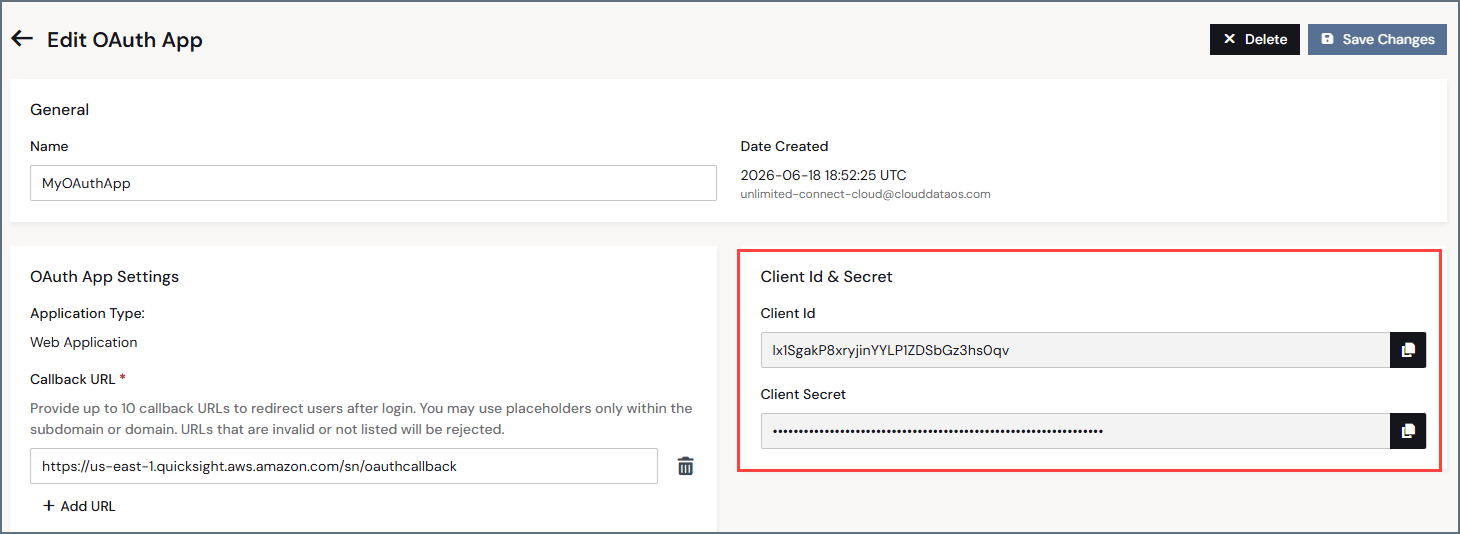 Return to the client application and paste the **Client Id** and **Client Secret** in the appropriate fields. For example, in Gemini Enterprise:
 The new OAuth app appears in the list of apps. Click the edit icon () to edit the app and add more callback URLs for other client applications, if needed.
Your external system might ask for information about the CData authorization, token, and registration URLs. They are as follows:
| Endpoint | Value |
| :---------------------------- | :------------------------------------------------------------------------------------- |
| **Authorization URL** | [https://cloud-login.cdata.com/authorize](https://cloud-login.cdata.com/authorize) |
| **Token URL** | [https://cloud-login.cdata.com/oauth/token](https://cloud-login.cdata.com/oauth/token) |
| **Registration URL** | [https://mcp.cloud.cdata.com/register](https://mcp.cloud.cdata.com/register) |
| **Authorization server base** | [https://mcp.cloud.cdata.com](https://mcp.cloud.cdata.com) |
| **Resource** | [https://mcp.cloud.cdata.com/mcp](https://mcp.cloud.cdata.com/mcp) |
The new OAuth app appears in the list of apps. Click the edit icon () to edit the app and add more callback URLs for other client applications, if needed.
Your external system might ask for information about the CData authorization, token, and registration URLs. They are as follows:
| Endpoint | Value |
| :---------------------------- | :------------------------------------------------------------------------------------- |
| **Authorization URL** | [https://cloud-login.cdata.com/authorize](https://cloud-login.cdata.com/authorize) |
| **Token URL** | [https://cloud-login.cdata.com/oauth/token](https://cloud-login.cdata.com/oauth/token) |
| **Registration URL** | [https://mcp.cloud.cdata.com/register](https://mcp.cloud.cdata.com/register) |
| **Authorization server base** | [https://mcp.cloud.cdata.com](https://mcp.cloud.cdata.com) |
| **Resource** | [https://mcp.cloud.cdata.com/mcp](https://mcp.cloud.cdata.com/mcp) |