> ## Documentation Index
> Fetch the complete documentation index at: https://docs.cloud.cdata.com/llms.txt
> Use this file to discover all available pages before exploring further.
# Navigation Menu
> The navigation menu serves as the connection and configuration center for your Connect AI account. It contains links to each section of Connect AI. When you log in, the **Dashboard** page displays.
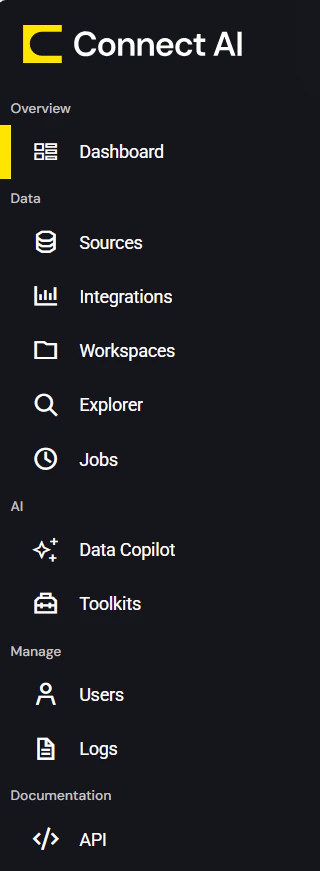 Click the name of a section in the list below for more details about that section of Connect AI:
* **[Dashboard](/en/Dashboard)** provides a concise view of information for connections and queries.
* **[Sources](/en/Sources)** contains controls for adding and managing data sources.
* **[Integrations](/en/Integrations)** provides assistance with connecting integration tools to Connect AI.
* **[Workspaces](/en/Workspaces)** provides assistance with creating and managing Connect AI workspaces and assets.
* **[Explorer](/en/Data-Explorer)** provides the ability to manage queries and derived views for your connections.
* **[Jobs](/en/Jobs)** enables you to create, manage, and run caching and scheduled query jobs.
* **[Data Copilot](/en/Data-Copilot)** provides an interface to ask Connect AI natural-language questions about your data.
* **[Toolkits](/en/Toolkits)** provides an area to create custom MCP tools for repeatable operations in your AI-driven workflows.
* **[Users and Roles](/en/Users)** enables you to invite and manage users.
* **[Logs](/en/Logs)** contains detailed logs for your Connect AI account.
* **[API](/en/API/API)** provides documentation for connecting to data via REST API, OData, or OpenAPI.
The top navigation bar of Connect AI contains the following items:
* A clickable icon that toggles the display of the left-pane navigation menu:
Click the name of a section in the list below for more details about that section of Connect AI:
* **[Dashboard](/en/Dashboard)** provides a concise view of information for connections and queries.
* **[Sources](/en/Sources)** contains controls for adding and managing data sources.
* **[Integrations](/en/Integrations)** provides assistance with connecting integration tools to Connect AI.
* **[Workspaces](/en/Workspaces)** provides assistance with creating and managing Connect AI workspaces and assets.
* **[Explorer](/en/Data-Explorer)** provides the ability to manage queries and derived views for your connections.
* **[Jobs](/en/Jobs)** enables you to create, manage, and run caching and scheduled query jobs.
* **[Data Copilot](/en/Data-Copilot)** provides an interface to ask Connect AI natural-language questions about your data.
* **[Toolkits](/en/Toolkits)** provides an area to create custom MCP tools for repeatable operations in your AI-driven workflows.
* **[Users and Roles](/en/Users)** enables you to invite and manage users.
* **[Logs](/en/Logs)** contains detailed logs for your Connect AI account.
* **[API](/en/API/API)** provides documentation for connecting to data via REST API, OData, or OpenAPI.
The top navigation bar of Connect AI contains the following items:
* A clickable icon that toggles the display of the left-pane navigation menu:
 * A Question Mark icon, which opens this documentation to the **[Getting Started](/en/docs)** page.
* A Gear Icon, which opens your Connect AI **[Settings](/en/Settings)**.
* Your username, which you can click to open a drop-down menu that allows you to contact support or sign out.
* A Question Mark icon, which opens this documentation to the **[Getting Started](/en/docs)** page.
* A Gear Icon, which opens your Connect AI **[Settings](/en/Settings)**.
* Your username, which you can click to open a drop-down menu that allows you to contact support or sign out.