> ## Documentation Index
> Fetch the complete documentation index at: https://docs.cloud.cdata.com/llms.txt
> Use this file to discover all available pages before exploring further.
# Integrations
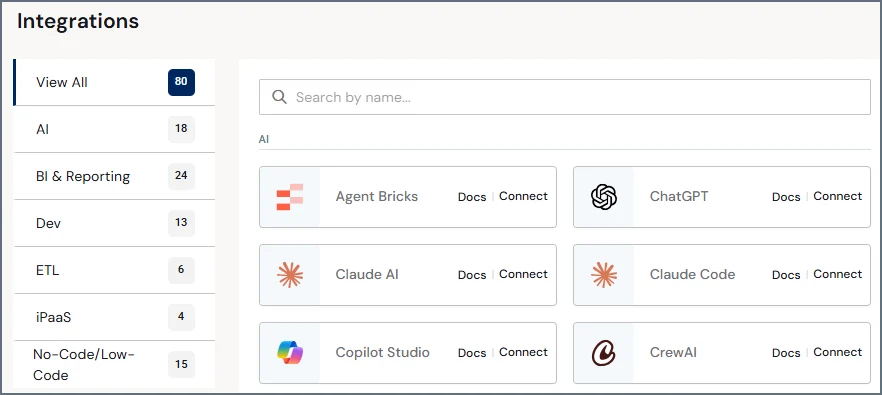
> The ***Integrations*** page presents a list of available integration tools. Use the search field to find an integration tool by name. You can also use the **View** drop-down list to view the integration tools by category: **AI**, **BI and Reporting**, **ETL**, **No-Code/Low-Code**, **Dev**, and **iPaaS**. Each integration tool card contains a link to open its documentation in an embedded navigation pane. Where appropriate, cards also contain links to download connectors and view endpoint information.
 ### AI Tools
Below is a list of the Artificial Intelligence (AI) tools that connect to Connect AI:
* [Agent Bricks](/en/Clients/AgentBricks-Client)
* [Amazon Quick](/en/Clients/AmazonQuick-Client)
* [ChatGPT](/en/Clients/ChatGPT-Client)
* [Claude](/en/Clients/Claude-Client)
* [Claude Code](/en/Clients/ClaudeCode-Client)
* [Codex](/en/Clients/Codex-Client)
* [CrewAI](/en/Clients/CrewAI-Client)
* [Cursor](/en/Clients/Cursor-Client)
* [Gemini](/en/Clients/Gemini-Client)
* [Gemini Enterprise](/en/Clients/GeminiEnterprise-Client)
* [GitHub Copilot](/en/Clients/GitHubCopilot-Client)
* [Grok](/en/Clients/Grok-Client)
* [LangChain](/en/Clients/LangChain-Client)
* [LangGraph](/en/Clients/LangGraph-Client)
* [LlamaIndex](/en/Clients/LlamaIndex-Client)
* [Lovable](/en/Clients/Lovable-Client)
* [Microsoft Copilot Studio](/en/Clients/MicrosoftCopilot-Client)
* [Microsoft Foundry](/en/Clients/MicrosoftFoundry-Client)
* [Mistral Le Chat](/en/Clients/Mistral-Client)
* [n8n](/en/Clients/N8N-Client)
* [Replit Agent](/en/Clients/Replit-Client)
* [Windsurf](/en/Clients/Windsurf-Client)
### BI and Reporting Tools
Below is a list of the Business Intelligence (BI) and Reporting tools that connect to Connect AI:
* [Alteryx](/en/Clients/Alteryx-Client)
* [Amazon QuickSight](/en/Clients/AmazonQuickSight-Client)
* [Azure Analysis Services](/en/Clients/AAS-Client)
* [APOS](/en/Clients/APOS-Client)
* [Crystal Reports](/en/Clients/CrystalReports-Client)
* [Excel](/en/Clients/Excel365-Client)
* [Geckoboard](/en/Clients/Geckoboard-Client)
* [Google Sheets](/en/Clients/GoogleSheets-Client)
* [IBM Cognos Analytics](/en/Clients/IBMCognos-Client)
* [Looker](/en/Clients/Looker-Client)
* [Looker Studio](/en/Clients/LookerStudio-Client)
* [Metabase](/en/Clients/Metabase-Client)
* [Microsoft Fabric](/en/Clients/MicrosoftFabric-Client)
* [MicroStrategy](/en/Clients/MicroStrategy-Client)
* [Mode](/en/Clients/Mode-Client)
* [PowerBI.com](/en/Clients/PowerBI.com-Client)
* [Power BI Desktop](/en/Clients/PowerBIDesktop-Client)
* [Qlik Sense](/en/Clients/QlikSenseCloud-Client)
* [Redash](/en/Clients/Redash-Client)
* [SAP Analytics Cloud](/en/Clients/SAPAnalyticsCloud-Client)
* [SAS Viya](/en/Clients/SASViya-Client)
* [Tableau Cloud](/en/Clients/TableauCloud-Client)
* [Tableau Desktop](/en/Clients/TableauDesktop-Client)
* [ThoughtSpot](/en/Clients/ThoughtSpot-Client)
* [Zoho Analytics](/en/Clients/ZohoAnalytics-Client)
### ETL Tools
Below is a list of the Extract, Transform, and Load (ETL) tools that connect to Connect AI:
* [Airbyte](/en/Clients/Airbyte-Client)
* [AWS Glue](/en/Clients/AWSGlue-Client)
* [Azure Data Factory](/en/Clients/AzureDataFactory-Client)
* [CData Sync](/en/Clients/CDataSync-Client)
* [Cloud Data Fusion](/en/Clients/CloudDataFusion-Client)
### No-Code/Low-Code Tools
Below is a list of No-Code/Low-Code tools that connect to Connect AI:
* [AppSheet](/en/Clients/AppSheet-Client)
* [AWS App Studio](/en/Clients/AWSAppStudio-Client)
* [Azure Logic Apps](/en/Clients/AzureLogicApps-Client)
* [Bubble](/en/Clients/Bubble-Client)
* [Filemaker Pro](/en/Clients/Claris-Client)
* [Mendix](/en/Clients/Mendix-Client)
* [Microsoft Power Apps](/en/Clients/MicrosoftPowerApps-Client)
* [Microsoft PowerAutomate](/en/Clients/MicrosoftPowerAutomate-Client)
* [Nintex](/en/Clients/Nintex-Client)
* [Outsystems](/en/Clients/Outsystems-Client)
* [Retool](/en/Clients/Retool-Client)
* [Salesforce External Services](/en/Clients/SalesforceExternal-Client)
* [Salesforce Lightning Connect](/en/Clients/SFLC-Client)
* [Workato](/en/Clients/Workato-Client)
* [Zapier](/en/Clients/Zapier-Client)
### Dev Tools
Below is a list of the development tools that connect to Connect AI:
* [ADO.NET](/en/Clients/ADO.NET-Client)
* [Apps Script](/en/Clients/AppsScript-Client)
* [Axios](/en/Clients/Axios-Client)
* [Choreo](/en/Clients/Choreo-Client)
* [Databricks](/en/Clients/Databricks-Client)
* [Databricks Lakehouse Federation](/en/Clients/DatabricksLHF-Client)
* [Grafana](/en/Clients/Grafana-Client)
* [JDBC](/en/Clients/JDBC-Client)
* [Node.js](/en/Clients/Nodejs-Client)
* [ODBC](/en/Clients/ODBC-Client)
* [Polybase](/en/Clients/Polybase-Client)
* [Python](/en/Clients/Python-Client)
* [SSIS](/en/Clients/SSIS-Client)
* [SQL Server Linked Server](/en/Clients/SQLServerLinked-Client)
### iPaaS Tools
Below is a list of the Integration Platform as a Service (iPaaS) tools that connect to Connect AI:
* [Jitterbit](/en/Clients/Jitterbit-Client)
* [MuleSoft](/en/Clients/Mulesoft-Client)
* [SnapLogic](/en/Clients/SnapLogic-Client)
### AI Tools
Below is a list of the Artificial Intelligence (AI) tools that connect to Connect AI:
* [Agent Bricks](/en/Clients/AgentBricks-Client)
* [Amazon Quick](/en/Clients/AmazonQuick-Client)
* [ChatGPT](/en/Clients/ChatGPT-Client)
* [Claude](/en/Clients/Claude-Client)
* [Claude Code](/en/Clients/ClaudeCode-Client)
* [Codex](/en/Clients/Codex-Client)
* [CrewAI](/en/Clients/CrewAI-Client)
* [Cursor](/en/Clients/Cursor-Client)
* [Gemini](/en/Clients/Gemini-Client)
* [Gemini Enterprise](/en/Clients/GeminiEnterprise-Client)
* [GitHub Copilot](/en/Clients/GitHubCopilot-Client)
* [Grok](/en/Clients/Grok-Client)
* [LangChain](/en/Clients/LangChain-Client)
* [LangGraph](/en/Clients/LangGraph-Client)
* [LlamaIndex](/en/Clients/LlamaIndex-Client)
* [Lovable](/en/Clients/Lovable-Client)
* [Microsoft Copilot Studio](/en/Clients/MicrosoftCopilot-Client)
* [Microsoft Foundry](/en/Clients/MicrosoftFoundry-Client)
* [Mistral Le Chat](/en/Clients/Mistral-Client)
* [n8n](/en/Clients/N8N-Client)
* [Replit Agent](/en/Clients/Replit-Client)
* [Windsurf](/en/Clients/Windsurf-Client)
### BI and Reporting Tools
Below is a list of the Business Intelligence (BI) and Reporting tools that connect to Connect AI:
* [Alteryx](/en/Clients/Alteryx-Client)
* [Amazon QuickSight](/en/Clients/AmazonQuickSight-Client)
* [Azure Analysis Services](/en/Clients/AAS-Client)
* [APOS](/en/Clients/APOS-Client)
* [Crystal Reports](/en/Clients/CrystalReports-Client)
* [Excel](/en/Clients/Excel365-Client)
* [Geckoboard](/en/Clients/Geckoboard-Client)
* [Google Sheets](/en/Clients/GoogleSheets-Client)
* [IBM Cognos Analytics](/en/Clients/IBMCognos-Client)
* [Looker](/en/Clients/Looker-Client)
* [Looker Studio](/en/Clients/LookerStudio-Client)
* [Metabase](/en/Clients/Metabase-Client)
* [Microsoft Fabric](/en/Clients/MicrosoftFabric-Client)
* [MicroStrategy](/en/Clients/MicroStrategy-Client)
* [Mode](/en/Clients/Mode-Client)
* [PowerBI.com](/en/Clients/PowerBI.com-Client)
* [Power BI Desktop](/en/Clients/PowerBIDesktop-Client)
* [Qlik Sense](/en/Clients/QlikSenseCloud-Client)
* [Redash](/en/Clients/Redash-Client)
* [SAP Analytics Cloud](/en/Clients/SAPAnalyticsCloud-Client)
* [SAS Viya](/en/Clients/SASViya-Client)
* [Tableau Cloud](/en/Clients/TableauCloud-Client)
* [Tableau Desktop](/en/Clients/TableauDesktop-Client)
* [ThoughtSpot](/en/Clients/ThoughtSpot-Client)
* [Zoho Analytics](/en/Clients/ZohoAnalytics-Client)
### ETL Tools
Below is a list of the Extract, Transform, and Load (ETL) tools that connect to Connect AI:
* [Airbyte](/en/Clients/Airbyte-Client)
* [AWS Glue](/en/Clients/AWSGlue-Client)
* [Azure Data Factory](/en/Clients/AzureDataFactory-Client)
* [CData Sync](/en/Clients/CDataSync-Client)
* [Cloud Data Fusion](/en/Clients/CloudDataFusion-Client)
### No-Code/Low-Code Tools
Below is a list of No-Code/Low-Code tools that connect to Connect AI:
* [AppSheet](/en/Clients/AppSheet-Client)
* [AWS App Studio](/en/Clients/AWSAppStudio-Client)
* [Azure Logic Apps](/en/Clients/AzureLogicApps-Client)
* [Bubble](/en/Clients/Bubble-Client)
* [Filemaker Pro](/en/Clients/Claris-Client)
* [Mendix](/en/Clients/Mendix-Client)
* [Microsoft Power Apps](/en/Clients/MicrosoftPowerApps-Client)
* [Microsoft PowerAutomate](/en/Clients/MicrosoftPowerAutomate-Client)
* [Nintex](/en/Clients/Nintex-Client)
* [Outsystems](/en/Clients/Outsystems-Client)
* [Retool](/en/Clients/Retool-Client)
* [Salesforce External Services](/en/Clients/SalesforceExternal-Client)
* [Salesforce Lightning Connect](/en/Clients/SFLC-Client)
* [Workato](/en/Clients/Workato-Client)
* [Zapier](/en/Clients/Zapier-Client)
### Dev Tools
Below is a list of the development tools that connect to Connect AI:
* [ADO.NET](/en/Clients/ADO.NET-Client)
* [Apps Script](/en/Clients/AppsScript-Client)
* [Axios](/en/Clients/Axios-Client)
* [Choreo](/en/Clients/Choreo-Client)
* [Databricks](/en/Clients/Databricks-Client)
* [Databricks Lakehouse Federation](/en/Clients/DatabricksLHF-Client)
* [Grafana](/en/Clients/Grafana-Client)
* [JDBC](/en/Clients/JDBC-Client)
* [Node.js](/en/Clients/Nodejs-Client)
* [ODBC](/en/Clients/ODBC-Client)
* [Polybase](/en/Clients/Polybase-Client)
* [Python](/en/Clients/Python-Client)
* [SSIS](/en/Clients/SSIS-Client)
* [SQL Server Linked Server](/en/Clients/SQLServerLinked-Client)
### iPaaS Tools
Below is a list of the Integration Platform as a Service (iPaaS) tools that connect to Connect AI:
* [Jitterbit](/en/Clients/Jitterbit-Client)
* [MuleSoft](/en/Clients/Mulesoft-Client)
* [SnapLogic](/en/Clients/SnapLogic-Client)