> ## Documentation Index
> Fetch the complete documentation index at: https://docs.cloud.cdata.com/llms.txt
> Use this file to discover all available pages before exploring further.
# JDBC
> This page outlines the steps to use the JDBC driver for Connect AI Embed.
## Install the Driver
Download and run the JDBC setup file for your operating system.
* [Windows Download](https://www.cdata.com/download/getfile.aspx?file=free/LFRK-V/setup.exe\&name=CData%20Connect%20JDBC%20Driver\&tag=Download-connect)
* [Linux Download](https://www.cdata.com/download/getfile.aspx?file=free/LFRK-V/setup.zip\&name=CData%20Connect%20JDBC%20Driver\&tag=Download-connect)
## Create a JDBC Data Source
Follow these steps to create a JDBC data source to connect to Connect AI Embed from your Java application:
Add the driver JAR file to the classpath. The JAR file is located in the `lib` subfolder of the JDBC driver for Connect AI installation directory.
**Note:** The .lic file must be located in the same folder as the JAR file.
Some applications automatically populate the driver class. For applications that do not automatically populate it, you must enter it manually. For example:
```bash theme={null}
cdata.jdbc.connect.ConnectDriver
```
Provide the JDBC URL. For example:
```bash theme={null}
jdbc:connect:AuthScheme=OAuth;
```
or
```bash theme={null}
jdbc:cdata:connect:AuthScheme=OAuth;
```
The second format above can be used to ensure you are using the CData driver whenever there is a conflict in your application between drivers using the same URL format. The URL must start with either `jdbc:connect:` or `jdbc:cdata:connect:`, and it must only include the AuthScheme setting as OAuth.
## Designate a Log File
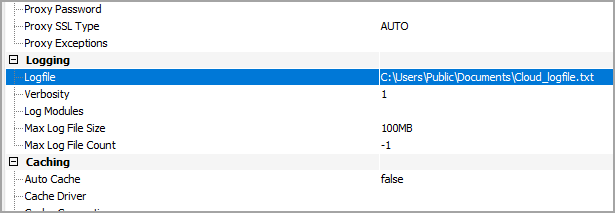
You can designate a log file for the JDBC driver in the **Advanced** tab of **Connection Properties**. You can also change the verbosity of the log file for greater detail.
 ## Learn More
To learn more information about using the JDBC driver for Connect AI Embed, click [here](https://cdn.cdata.com/help/LFM/jdbc/default.htm).
## Learn More
To learn more information about using the JDBC driver for Connect AI Embed, click [here](https://cdn.cdata.com/help/LFM/jdbc/default.htm).